
Balancing Privacy and Connectivity
In another post we explore how to control who sees your Spime. But what if you want to keep your Spime hidden from public view while still allowing select individuals—perhaps friends or family far away—to join?
Imagine hosting a private family gathering. You don’t want it appearing on the Trending or Discover screens, but you’d love for grandparents across the globe to experience the moment in real time. Since your Spime isn’t publicly visible, they can’t find or join it on their own.
Introducing “Hide from the World – EXCEPTIONS”
With this feature, you can hide your Spime from the world while manually granting access to specific users. This means you control exactly who can see and join, even if they’re far away.
The users you add as exceptions can see and join your Spime under "Distant Spimes" on their Dashboard.
As easy as 1, 2, 3.
HOW TO ENABLE
1
Hide From The World
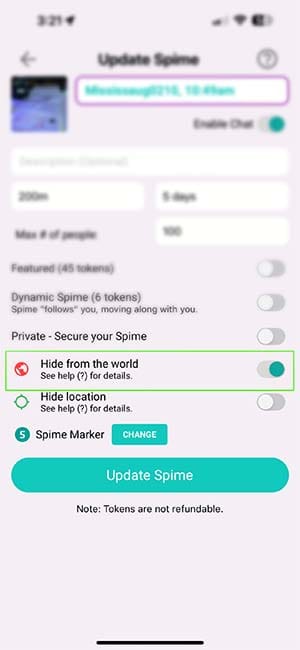
Find your Spime under "Near Me", enter it, and tap the edit icon. Slide "Hide From the World" to ON—the globe will turn red. Tap on Update Spime.
2
"Add Exceptions" Link
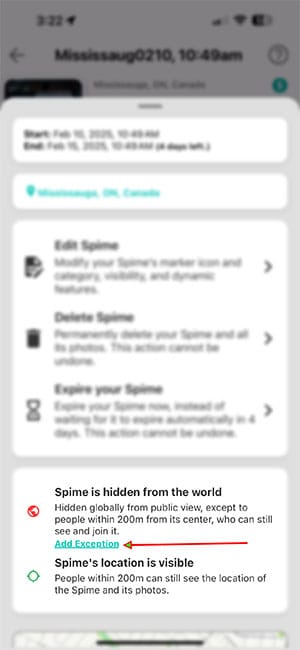
Edit your Spime again and tap on the "Add Exception" link.
3
Add Exceptions
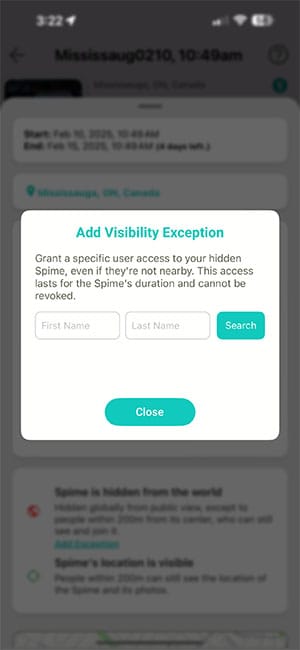
Enter the first and/or last name of the user you wish to grant an exception to. The name must be entered exactly as it appears in their Spime profile.
Stay Private, Stay Connected
Now, you can share meaningful moments with the people who matter—without making your Spime publicly discoverable. Try it today and take full control of your Spime’s visibility!